Your knowledge library
Spaces, files, extracted text, and managed assets stay in local application data. SQLite stores structure; LanceDB supports semantic search.
A calm, capable space for your most important work.
Explore the latest releaseLocal-first, by design
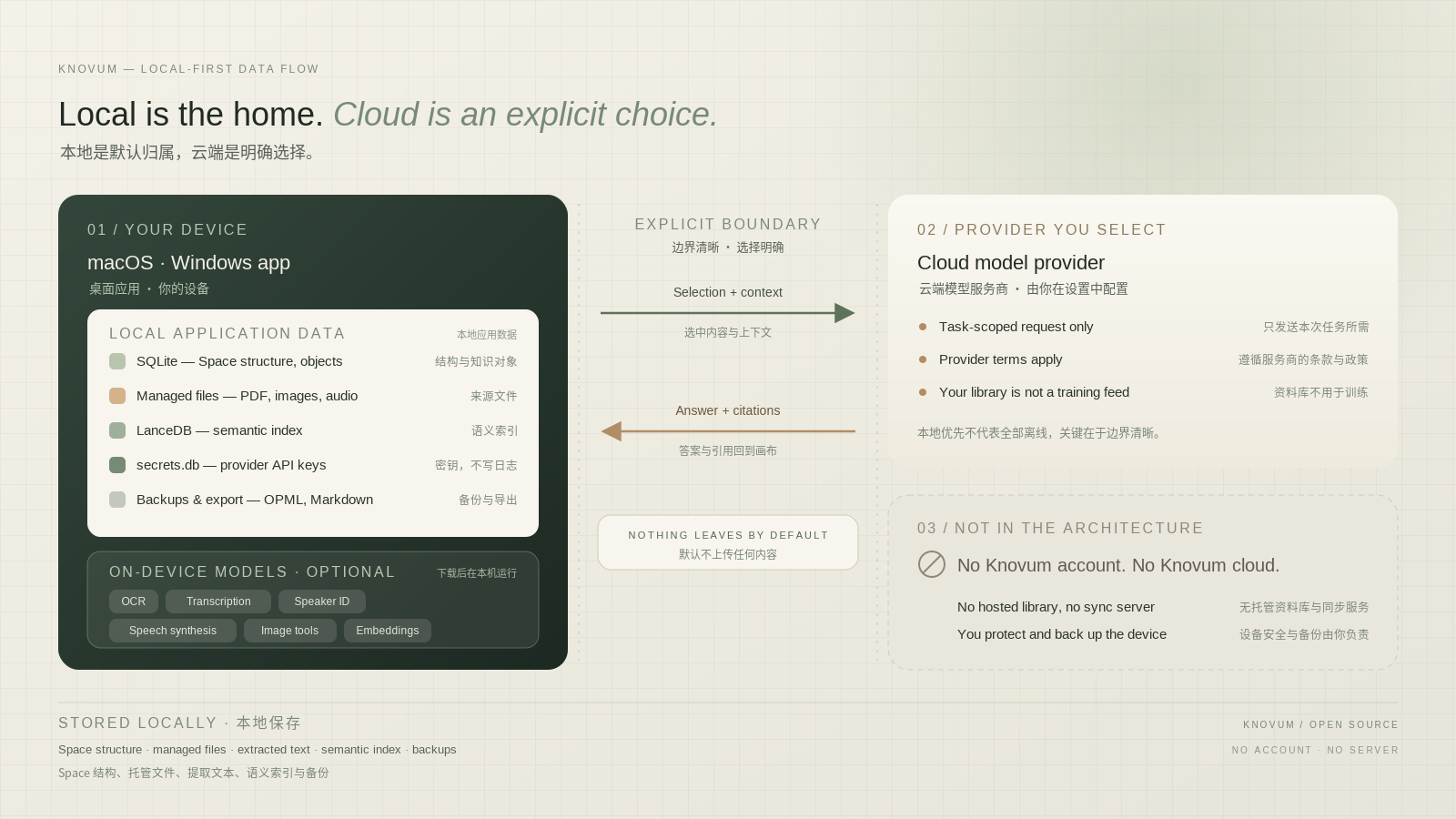
Knovum is built around a simple boundary: your library lives on your device. When you choose to use a cloud model, only the context needed for that task is sent to the provider you selected.
The data boundary
Knovum does not require an account and does not operate a hosted knowledge service. Your Spaces, source files, extracted text, search indexes, and backups are stored in local application data on your device.
That means Knovum itself is not a place where your library is uploaded and synchronized. It also means you are responsible for protecting and backing up the device where your library lives.
| Data | Where it lives | Leaves your device? |
|---|---|---|
| Spaces, notes & source files | Local application data | No |
| Extracted text & search indexes | Local application data | No |
| API keys & credentials | Dedicated local secrets database | No |
| Downloaded model files | Local application data, removable | No |
| Cloud AI answers & generation | The provider you select, task-scoped | Only when you choose |
Where things happen
Spaces, files, extracted text, and managed assets stay in local application data. SQLite stores structure; LanceDB supports semantic search.
Editing, keyword and semantic search, transcription, speaker recognition, OCR, speech synthesis, and listed image tools can run locally after model downloads.
For a cloud-model answer or generation task, Knovum sends the selection and context needed for that task to the provider you chose. That provider's terms apply.
A cloud provider's handling of requests is governed by that provider's own terms, privacy policy, and account settings.
What stays local
Knovum's architecture keeps the knowledge store on your device. Local application data includes the Space structure, managed content, extracted text, semantic index, and backups.
SQLite, LanceDB, and local managed files.
API keys are stored in a dedicated local secrets database and are not written to logs.
Downloaded when a feature needs them, verified against pinned SHA-256 digests, and removable from Settings.
A clear-eyed approach
Some capabilities are local after their models are downloaded. AI answers and generation can use cloud services when you configure and choose them. Knovum makes that distinction explicit; it does not make third-party provider policies on your behalf.
Keep your library close. Make every external handoff intentional.
Optional usage measurement
The public website can load Cloudflare Web Analytics for page-view and performance measurements. The beacon is not loaded unless the site owner configures a Cloudflare site token for the deployment. Cloudflare processes website measurement data under its own terms and privacy policy.
Desktop usage analytics is enabled by default. When the analytics endpoint is configured, Knovum sends at most one app-start event per UTC day, containing a random installation identifier, app version, operating-system platform, and event name. The identifier is pseudonymous and is transformed into an HMAC digest before storage; the original identifier is not stored. Daily records are deleted after 90 days. You can turn off analytics in Settings → About at any time. D1 does not store Spaces, notes, files, file paths, searches, prompts, generated content, credentials, account details, names, email addresses, or request IP addresses. Cloudflare may process connection metadata under its own terms and privacy policy.
Turn the setting off at any time to stop future events and clear the local installation identifier. Previously received daily records remain subject to the 90-day deletion window.
Desktop usage analytics is enabled by default. You can turn it off in Settings → About at any time.
Built to keep you in control.